


Java Tutorials'a Hoş Geldiniz
Java programlama dilini öğrenmek için kapsamlı eğitimler ve kaynaklar.
İçerikler yakında eklenecek...
⊙ Java Tutorial 161 - ⊙ Java Tutorial
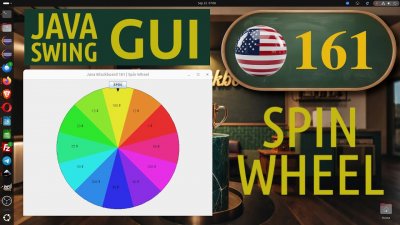
Key Concepts & Highlights
◉ Animated #spinwheel Java Swing
◉ Random speed/smooth slowdown effect
◉ Animation control with Timer and ActionListener
◉ Dynamic slice colors, Graphics2D
◉ Visual pointer for selected prize
Java Tutorials... | Java | Spin Wheel Game with Animated Timer and Random Speed
Java Tutorial Files: 161


Java Tutorial | Files: *.java and *.zip and images
⊙ Java Tutorial 161 | Comments

JAVA.000.001.005
Philip Solaris [philip_sol]
 Canada
rly cool tutorial!! the math for the animation and timer class was super helpful for my project. i always struggled with circular positioning but it makes sense now. thnx for this!! 00:13 de kodu nasıl görebileceğimizi anlattı.

JAVA.000.001.003
Philip Star [philip_star]
 Brazil
Nice tutorial! The way you explained slice angles and the trig part for placing text around the wheel was really clear. I’m still learning Swing graphics and animation, but this spinning wheel example made things click. Also liked the smooth slowdown effect 👍

JAVA.000.000.063
Pigeon [pigeon]
 Türkiye
rly cool tutorial!! the math for the animation and timer class was super helpful for my project. i always struggled with circular positioning but it makes sense now. thnx for this!! he explained how to see the code at 00:13.

JAVA.000.001.002
Selim ACAR [selimacar]
 Location
Gerçekten çok havalı bir spinning wheel dersi olmuş, dilim açıları ve trigonometrik etiket yerleştirme kısmı çok net anlatılmış. Timer ile yavaşlayan animasyon çok akıcı ve denemesi eğlenceli. Custom grafikler hakkında bayağı şey öğrendim.

JAVA.000.001.006
Karde Alen [kardealen]
 France
rly impressed with how u handled the trigonometric positioning for the labels. the gradual slowdown logic makes the wheel feel rly realistic. thnx for this solid intermediate guide, it's a great resource for my computer science projects!! solid work :)

JAVA.000.001.004
Philip Diamond [philip_di]
Sweden
rly impressed with the technical depth of this spinning wheel tutorial. the trigonometric positioning for labels and the timer-based animation are rly solid. thnx for the professional breakdown of custom graphics, a top tier guide for intermediate game dev!! :)

JAVA.000.000.011
Mars Line [mars]
Canada
Actually, the technical breakdown of circular graphics is rly impressive. The part at 00:17 about downloading the project was rly helpful to get started quickly. Thnx for explaining the trigonometric positioning so clearly, solid guide for game dev!! :)

JAVA.000.000.009
Rıdvan Dilmen [blackboard]
Türkiye
yooo this spinning wheel is sick!! the math for the label positioning always trips me up but u made it look rly easy. loved the smooth slowdown effect with the timer too. def adding this to my project collection, thnx for the tut! :)

JAVA.000.001.000
Equalizer [equalizer]
Location
Really enjoyed this one, spinning logic feels very natural and smooth 👍 angle math + Timer usage is explained in a simple way. Nice example for ppl who wanna move from basic Swing to more visual, game-like stuff.

JAVA.000.000.006
Arcanus Board [board]
Türkiye
This spinning wheel example is really fun to watch and code 🙂 The angle math and label positioning are explained very clearly, and the smooth slowdown with Timer feels very realistic. Great intermediate project for learning custom graphics and animation in Java.

JAVA.000.000.015
Ceviz [ceviz]
Brazil
Building on the Java fundamentals we've discussed, this tutorial is a fantastic leap into the world of custom graphics and interactive game design. I really appreciated how it simplifies complex tasks like trigonometric label positioning and the mathematical logic behind color-coded segments. The implementation of a gradual slowdown using the Timer class makes the animation feel incredibly professional and realistic. It’s a perfect intermediate project for anyone looking to bridge the gap between basic syntax and visually engaging, logic-driven applications!

JAVA.000.000.005
Camilla Iceberg [iceberg]
 India
India
Really enjoyed this spinning wheel example, the way the animation slows down and the prizes are positioned around the circle makes the logic very clear and practical. It’s a great intermediate Java tutorial that nicely combines graphics, math, and animation in a fun, easy-to-follow way.

JAVA.000.000.038
Samarra Teçhizat [samarra]
Location
Really nice example, the spinning animation and math part helped me understand how this kind of game logic works in Java.

JAVA.000.000.037
SEIKO Prospex [seiko]
Location
The trigonometric positioning for the labels is a lifesaver for getting the UI to look professional and aligned. As someone focused on visual appeal, I think the realistic slowdown animation adds that perfect touch to keep users engaged!

JAVA.000.000.036
Amazon Tree [amazon]
Location
Great tutorial! I’ve been working on some user profile projects lately, and this is exactly the kind of interactive logic I needed to spice up my UI. The way you handled the trigonometric positioning for the prize labels was incredibly helpful—properly aligning text around a circumference can be a real headache without that math. I especially liked the realistic slowdown animation with the Timer class; it makes the game feel much more professional than a basic random stop. This is a perfect intermediate step for anyone looking to move beyond static Java graphics!

JAVA.000.000.035
Kumru Vefa [kumru]
Location
This is a fantastic and visually engaging way to learn intermediate Java graphics. As someone who appreciates clear structure and practical applications—from language rules to game logic—I found the breakdown of the trigonometry for label positioning and the Timer class for the smooth spin especially insightful. It perfectly bridges core programming with a fun, tangible result. The attention to locale-aware design principles even subtly applies here, ensuring text is properly handled on the wheel. Great tutorial for making complex concepts feel approachable and useful.

JAVA.000.000.017
Atlantis [atlantis]
Türkiye
this is a fun and well-explained example of building an interactive game with java graphics. the math behind the wheel segments and label positioning is explained clearly. using the timer for smooth animation and random speed makes the project feel realistic. a great intermediate-level tutorial for improving graphical and game development skills in java.

JAVA.000.000.001
Zeynep Kılıçtaş [gerbera]
Türkiye
this tutorial shows a very creative use of java beyond simple console programs. the explanation of slice angles, trigonometry, and text placement around the wheel makes the graphics logic easy to follow. i especially liked the realistic spinning animation and smooth slowdown effect. it’s a strong intermediate project for learning custom graphics and animation in java.

JAVA.000.000.018
Patella [patella]
Türkiye
this tutorial is a great example of using java for visually engaging and interactive projects. the explanations of slice angles, trigonometry, and text positioning around the wheel make the graphics math easy to follow. i especially liked the realistic spinning effect and smooth slowdown created with the timer and random speed logic. it’s a strong intermediate-level project for improving skills in custom graphics, animation, and game development in java.

JAVA.000.000.021
Phoenix [phoenix]
Türkiye
this tutorial shows a really creative side of java and goes beyond simple console applications. the explanation of angle math, trigonometry, and text placement around the wheel makes the graphics logic easy to follow. i especially liked the smooth spinning animation and realistic slowdown using the timer and random speed. it’s a strong intermediate project for learning custom graphics, animation, and interactive game logic in java.

JAVA.000.000.019
Tibia [tibia]
Türkiye
this tutorial shows a really creative side of java and goes beyond simple console examples. the way angle calculations, trigonometry, and text placement around the wheel are explained makes the graphics logic easy to follow. i especially liked the realistic spinning effect created with random speed and gradual slowdown using timers. it’s a strong intermediate project for learning custom graphics, animation, and interactive game logic in java.

JAVA.000.000.020
Tulip [tulip]
Türkiye
this tutorial is a great example of how java can be used for creative and interactive projects beyond basic console programs. the explanation of angle calculations, trigonometry, and text positioning around the wheel makes the graphics logic much easier to understand. i really liked how the spinning animation slows down realistically using timers and random speed values. it’s a strong intermediate-level project that helps build confidence in custom graphics, animation, and game logic in java.

JAVA.000.000.025
Ilavus Rose [ilavus]
Türkiye
This project looks like a brilliant way to step up from beginner Java! I’m particularly interested in seeing how the mathematical concepts—specifically the trigonometric positioning of the prize labels and the calculations for the gradual slowdown animation —translate into smooth, custom graphics. It’s a great intermediate challenge that combines practical game logic with visual execution. I’m excited to dive into the custom drawing and Timer implementation!

JAVA.000.000.003
Pilav Tepe [pilavtepe]
Türkiye
What an engaging Java project! Your approach to circular graphics with mathematically precise segment angles and smooth trigonometric positioning of labels is truly impressive. The realistic spin animation with gradual deceleration through Timer class demonstrates excellent understanding of Java's animation capabilities. This tutorial perfectly bridges mathematical concepts with practical, visually appealing game development—great inspiration for intermediate programmers!